

Email Builder
How to reschedule an email campaign? (Email Builder)
1 min read Updated 13 June 2023
Rescheduling of Email Campaign is possible for Simple Schedule, Batch Schedule, and RSS Schedule one hour (60mins) ahead of the execution date.
The user will be required to visit Marketing > Email. Please visit the Email Campaign tab: it will have a list of Email Campaigns listed with Simple Schedule, RSS Schedule, and Batch Schedule, which can be rescheduled one hour after the execution date/time.
1. Under the action button drop-down, select Reschedule Campaign.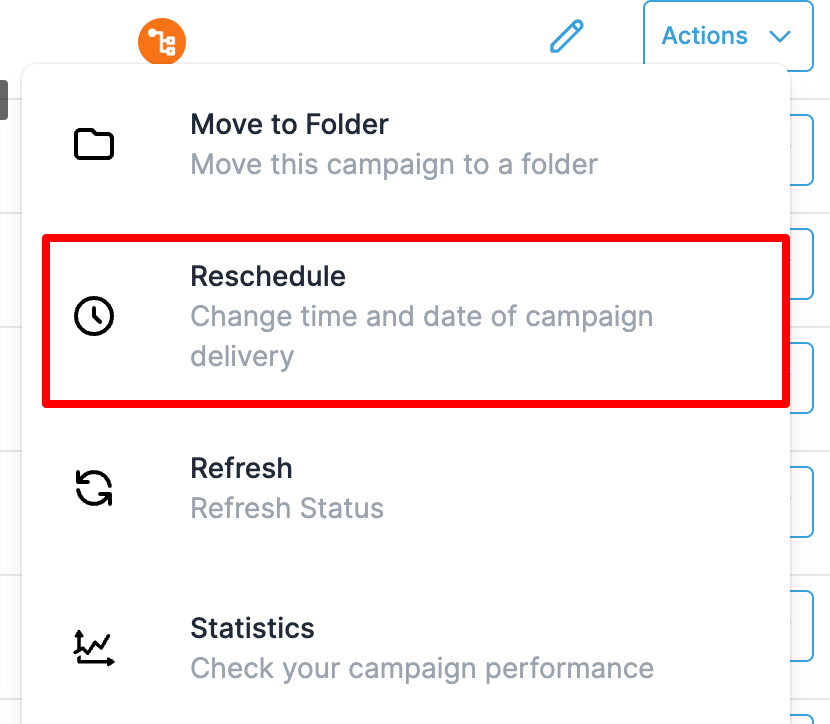 2. The user can change the Schedule's details and change the delivery model. Once the changes are done, the user must mark it as the rescheduled campaign to save the settings.
The user will be required to visit Marketing > Email. Please visit the Email Campaign tab: it will have a list of Email Campaigns listed with Simple Schedule, RSS Schedule, and Batch Schedule, which can be rescheduled one hour after the execution date/time.
Steps to Reschedule an Email Campaign
1. Under the action button drop-down, select Reschedule Campaign.
2. The user can change the Schedule's details and change the delivery model. Once the changes are done, the user must mark it as the rescheduled campaign to save the settings.
More in Email Builder
- How to import HTML Email Templates/ Campaigns
- Email Sequences: Automated Follow-Ups
- How Recipients Can Resubscribe to an Email List
- Create and Use Text and Email Snippets
- How to Preview and Test Your Email Campaigns/Templates
- How to Add GIFs to Emails
- How to Use the Email AI Editor
- A/B Testing Emails with Email AI
- Create Email Sequences with Email AI
- How to Customize Mobile Formatting in the Email Builder ?