

Prospecting Tool
How to find Leads for a business using Prospecting Tool
1 min read Updated 30 August 2026
Lead Contact Details
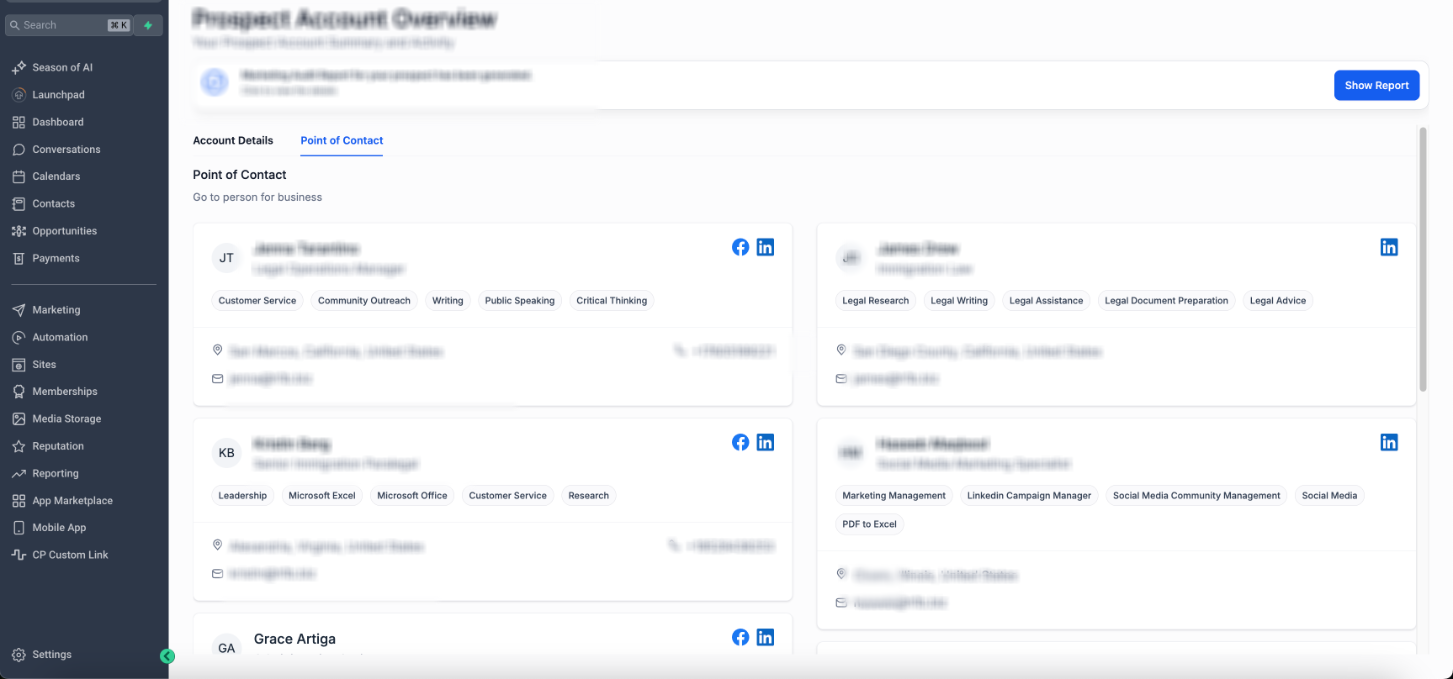
Users can access comprehensive lead information directly within the Point of Contacts section of the Prospecting Tool, including:
- Lead Information: For each generated prospect, users can now access vital lead details such as their role, expertise, and more.
- Social Media Profiles: Easily connect with prospects through their linked Facebook, Twitter, and LinkedIn profiles (if available).
- Location Details: Gain insights into the geographical location of prospects, helping you tailor your outreach strategies effectively.
- Contact Information: Access essential contact details including phone numbers and email addresses, streamlining your communication process.
How to Access POC Details of a Prospect:
- In the Sub Account View, go to "Prospecting" in the side navigation menu
- Go to any Prospect Account in the Dashboard
- Proceed to Point of contacts tab to view the Lead information
More in Prospecting Tool
- Understanding the Grades in Your Marketing Audit Report
- SEO Heatmaps in the Prospecting Tool: A Support Guide
- Analysing Website Performance of a prospect in the Marketing Audit Report
- Prospecting Tool: Create Prospecting Widgets For Your Websites
- Key components of the Marketing Audit report in the Prospecting Tool
- Prospecting Widgets Localization: Emails, Reports & Forms
- How Prospecting creates contacts in your CRM