

Ad Manager
How to connect Instagram account with Facebook page?
1 min read Updated 30 August 2026
Below is the step-by-step guide to Connect Your Instagram Account to a Facebook Page. To run ads on Instagram via Ad Manager, you must connect your Instagram Business Account to your Facebook Page. Once the Instagram account is connected to Facebook page, it will automatically be selected whenever the Facebook page is chosen to publish an ad. This setup is to be done from the Meta platform.
Step 1: Switch to an Instagram Business or Creator Account
Note: Skip this step if your Instagram is already a Business Account.
- Open Instagram App and go to your profile.
- Tap the hamburger(☰) Menu (top right) to land on Settings and activity.
- Scroll down and tap Account type and tools > Switch to professional account.
- Choose Business (recommended for ads) or Creator.
- Select your Business Category (e.g., E-commerce, Health & Wellness).
- Tap Next, and follow the prompts to complete the setup.
Step 2: Connect Instagram to your Facebook Page
A: Via Facebook Page Settings (Recommended)
- Go to Facebook and open your Business Page.
- Click Settings (left sidebar).
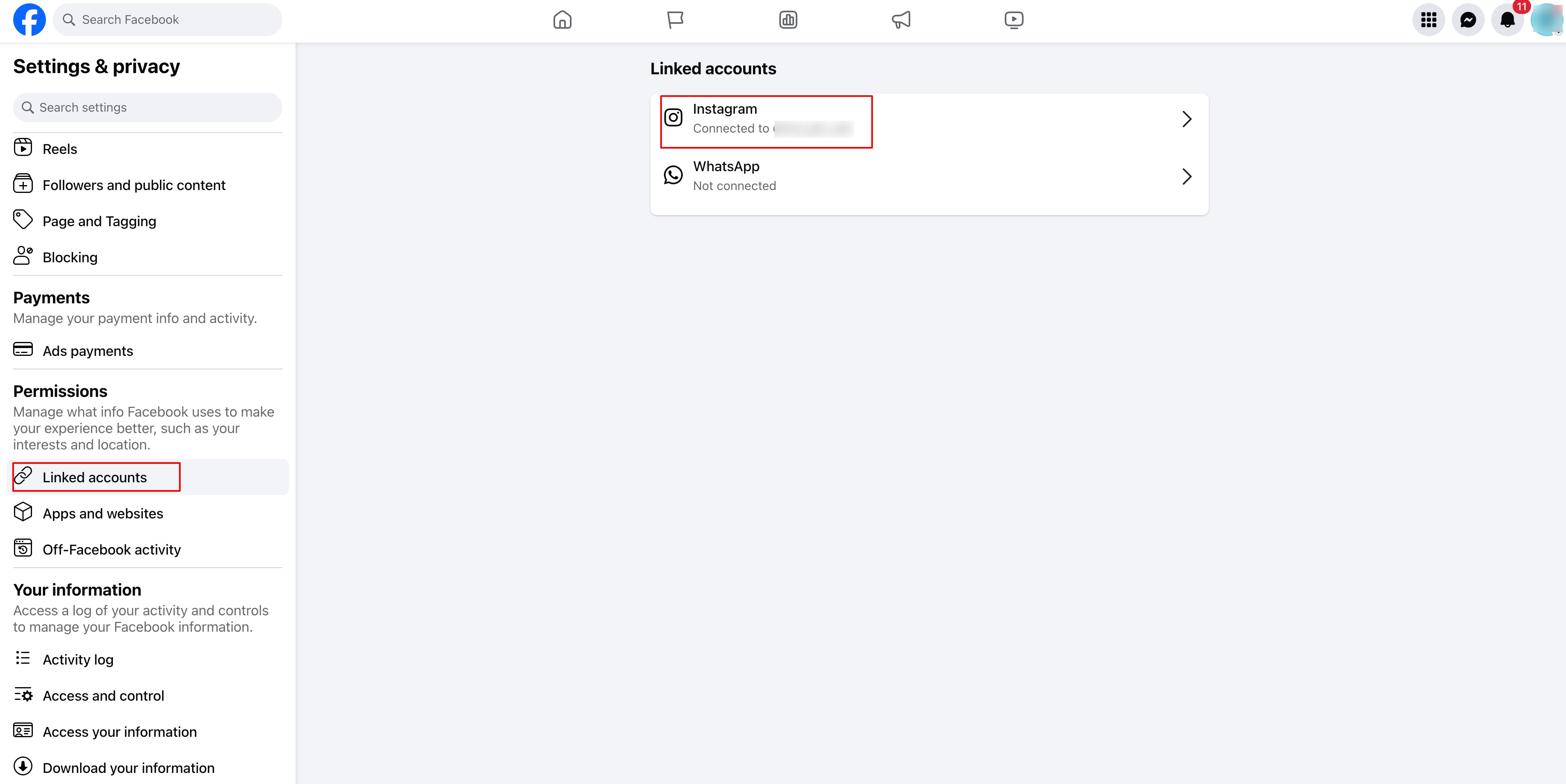
- Select Linked Accounts > Instagram.
- Click Connect Account and log in to your Instagram account.
- Ensure the option Allow Access to Messages & Connected Experiences is enabled.
- Click Confirm to complete the connection.
B: Via Instagram App(this option will be available if you have a professional account)
- Go to your Instagram Profile.
- Tap Edit Profile → Scroll to Public Business Information.
- Tap Page → Connect or Create a Facebook Page.
- Select your existing Facebook Page or create a new one.
- Tap Done to save changes.
Step 3: Verify the Connection in Meta Business Suite
- Open Meta Business Suite (business.facebook.com)
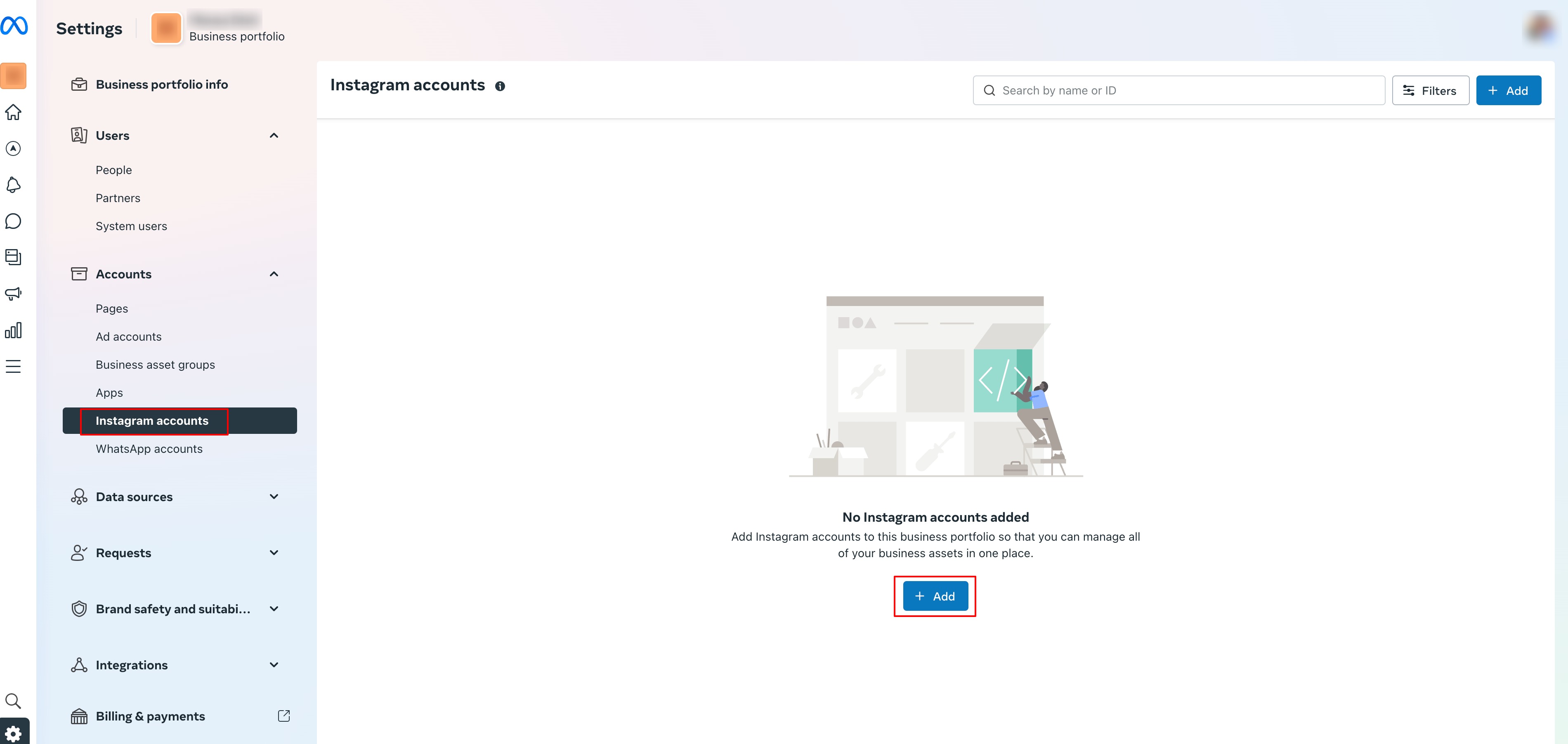
- Click Settings → Instagram Accounts.
- Your Instagram account should be listed.
- If not, click Add Instagram Account and follow the login steps.
Final Check:
- Instagram is set as a Professional Account.
- Connected to the correct Facebook Page.
- Verified in Meta Business Suite.
Note: Only one Instagram account can be connected to a Facebook page.
More in Ad Manager
- Campaign Opportunity Score in Ad Manager
- Create a new Google Search Ad Campaign
- Create Google Demand Gen Campaigns in Ad Manager
- Google Ads: Multiple Ad Groups and Ads
- Guidelines for using custom questions in Google lead forms
- How to create a Facebook form in Ad Manager
- How to create a Meta Business Manager and Ad account?
- How to create a Meta Sales objective campaign for Conversion
- How to create a multiple ad group Google search ad campaign
- How to Create Google Ads Conversion Actions in Ad Manager
- How to Set Up a Precautionary Ad Tracking Script
- How to Use Meta Recommendations in Ad Manager