

RCS in Open Doors
RCS gives businesses a richer messaging experience than traditional SMS by supporting branded sender identities, media, interactive elements, and enhanced delivery signals on compatible devices.
RCS is available through Labs for selected sub-accounts. Businesses can register senders and track approval. Live messaging requires an approved RCS sender, and SMS fallback may be used when supported and configured.
ImportantRCS Messaging is available through Labs, not enabled by default for every account. Agencies can select sub-accounts for access. A registered sender must receive carrier and provider approval before live messaging.
Table of Contents1What is RCS?2RCS Messaging Availability Through Labs3Key Benefits of RCS4What You Can Send with RCS5How RCS Compares to SMS and MMS6Who Can Receive RCS?7Compliance and Consent8Before You Set Up RCS9Fees & Timelines (US Registrations)10How to Enable RCS and Register Your Sender11Message Statuses12Pricing and Billing13Failed Message Billing14Frequently Asked Questions15Ready to Get Started?16Related Articles1What is RCS?
Rich Communication Services (RCS) expands business messaging beyond traditional SMS by allowing compatible recipients to receive branded and interactive messages in their supported messaging app. Understanding how RCS differs from SMS helps you design messages that take advantage of rich features while remaining effective when SMS fallback is required.
RCS on the platform can support capabilities such as:
- Branded business identity
- Images and rich media
- Tappable actions such as Call , Open URL , and Suggested Reply
- Standalone rich cards
- Carousels
- Delivery signals
- Read or Opened signals when supported by the recipient's device and settings
Recipients must have a supported device, messaging app, carrier or network, and RCS configuration. When those requirements are not met, the platform can use SMS fallback when fallback is enabled.
The Core IdeaRCS adds business branding and interactive features to messaging. For contacts who cannot receive RCS, supported SMS fallback can provide an alternative when configured.
2RCS Messaging Availability Through Labs
Labs gives agencies control over which sub-accounts can access RCS while the feature is being introduced more broadly.
RCS Messaging is available through Labs . Agencies can introduce RCS to selected sub-accounts and let businesses register senders directly inside the platform. A Private Beta application is no longer required for the new Labs onboarding path.
- Agency-level control: Enable RCS for chosen sub-accounts instead of activating it for everyone.
- Self-service registration: Complete business details and submit sender information without leaving the account.
- Approval tracking: Monitor the sender registration process from the RCS Messaging area.
Labs access does not mean the sender is approved. Live RCS messaging requires carrier and provider approval. Availability also depends on supported countries, carriers, and recipient devices.
3Key Benefits of RCS
RCS combines familiar business messaging with richer branding and interaction options. These capabilities can make messages easier to recognize, act on, and measure while SMS fallback provides an alternative for contacts who cannot receive RCS.
Branded Messaging, Display a recognizable business identity in supported RCS experiences instead of relying only on a phone number.Rich Content, Add supported images, cards, carousels, and structured content to create more engaging messages.Interactive Actions, Give contacts tappable options such as calling your business, opening a URL, or selecting a suggested reply.Flexible Sending, Use RCS in supported 1:1 Conversations, RCS Snippets, Bulk Actions, and supported Workflow experiences.Delivery Visibility, View delivery states such as Sent, Delivered, and Opened when the recipient's device supports the applicable signal.SMS Fallback, Deliver an SMS alternative when the recipient cannot receive the intended RCS experience and fallback is configured.Agency-Controlled Labs Access, Choose which sub-accounts can access RCS while introducing the feature gradually.In-Platform Sender Onboarding, Complete registration, save progress, and track approval directly within the platform.4What You Can Send with RCS
RCS gives you a set of tools that plain SMS simply doesn't offer. Depending on your plan and configuration, you can send:
- Branded messages, your business name appears in the inbox instead of a phone number
- Images and rich media layouts
- Tappable action buttons, Call, Open URL, or Suggested Replies
- Standalone rich cards with titles, descriptions, images, and buttons
- Carousels, multiple swipeable cards in a single message
- Read receipts and delivery signals where the recipient's device supports them.
How RCS Compares to SMS and MMS
Before using RCS, it helps to understand exactly what it adds, and where its limits are. The biggest one: RCS reach is growing but not yet universal. That makes it important to design every message so the SMS fallback version is just as clear and useful as the rich version.
| Feature | SMS | MMS | RCS |
|---|---|---|---|
| Text messaging | ✅ | ✅ | ✅ |
| Images and media | ❌ | ✅ | ✅ |
| Branded sender experience | ❌ | ❌ | ✅ |
| Rich cards | ❌ | ❌ | ✅ |
| Carousels | ❌ | ❌ | ✅ |
| Suggested replies and actions | ❌ | ❌ | ✅ |
| Delivery status | Limited | Limited | ✅ |
| Read/Open status | ❌ | ❌ | ✅ when supported |
| Requires RCS-compatible recipient | ❌ | ❌ | ✅ |
| SMS fallback support | N/A | N/A | ✅ |
Before finalizing any RCS message, ask: if this arrives as plain text with no image and no buttons, does it still make sense? If yes, you're ready. If no, revise the copy first.
6Who Can Receive RCS?
RCS delivery depends on four things aligning on the recipient's end: their device , their messaging app , their carrier , and their app settings . In practice:
- Most modern Android devices using Google Messages or a carrier-supported app are ready to receive RCS
- iPhone support depends on iOS version and carrier, many iPhone users still receive SMS fallback today
- Even within Android, some carrier configurations limit certain RCS features
- Recipients can disable RCS features in their app settings, which also triggers fallback
The platform handles detection and routing automatically. You send one message, the platform determines whether to deliver it as RCS or fall back to SMS based on what the recipient can actually receive.
What Fallback Means in PracticeWhen a message falls back to SMS, the recipient gets your fallback text instead of the rich card. Billing reflects SMS pricing for that message. Opt-outs apply across both channels, a contact who opts out via SMS is suppressed on RCS too.
7Compliance and Consent
RCS is a branded, high-visibility channel, which means the same compliance principles that govern SMS apply here, just with higher stakes. Getting this right protects your deliverability, your sender reputation, and your customers.
Requirement 1Opt-InOnly send RCS to contacts who have explicitly opted in. Your opt-in must tell them what type of messages they'll receive, how often, how to opt out, and how to reach support.
Requirement 2Opt-OutHonor these keywords immediately and without exception, they must suppress all future messages across both RCS and SMS:
STOP • UNSUBSCRIBE • CANCEL • END • QUIT
The opt-out notice is appended to the first 1:1 RCS message sent to a new contact, unlike SMS, it doesn't repeat periodically after that. Texas blocking rules apply the same as SMS and MMS.
Requirement 3Content and Sending FrequencyAvoid deceptive, misleading, or spammy content. Keep sending frequency consistent with what you promised at opt-in. Reminders, confirmations, and genuinely useful updates perform best, they feel like service, not noise. For regulated industries, ensure your messaging aligns with your specific legal obligations.
Pro Tip: Sender IdentityUse a sender name that matches your business or website exactly. Inconsistency in your sender identity erodes trust and increases opt-outs over time.
8Before You Set Up RCS
Preparing your business details in advance helps you complete sender registration accurately and reduces unnecessary approval delays.
Before you enable RCS, gather the business details needed for brand verification and make sure the sub-account has the required access. Registration now takes place in the RCS Messaging settings rather than through a standard Support-led request.
- Business information: Brand name, business website, address, and contact details.
- Brand assets: Business logo and other sender branding details as requested.
- Messaging use case and consent: Information about what the business sends and how recipients opt in.
- Target countries: Countries where the business intends to send RCS messages.
- Additional verification: US-specific information when applicable.
You can save registration progress and return later. Exact requirements vary by country and business.
9Fees & Timelines (US Registrations)
There are carrier fees involved for US registrations:
| Fee | Amount (USD) | Frequency |
|---|---|---|
| Brand Verification | $200 | Per year |
| T-Mobile Submission | $500 | One-time |
Registrations are also available for several other countries.
Setup GuideFrom Labs Activation to Your First RCS MessageFive steps to enable RCS, register, obtain approval, and start sending.10How to Enable RCS and Register Your Sender
Enable RCS through Labs, complete self-service registration, and wait for sender approval before sending live customer messages.
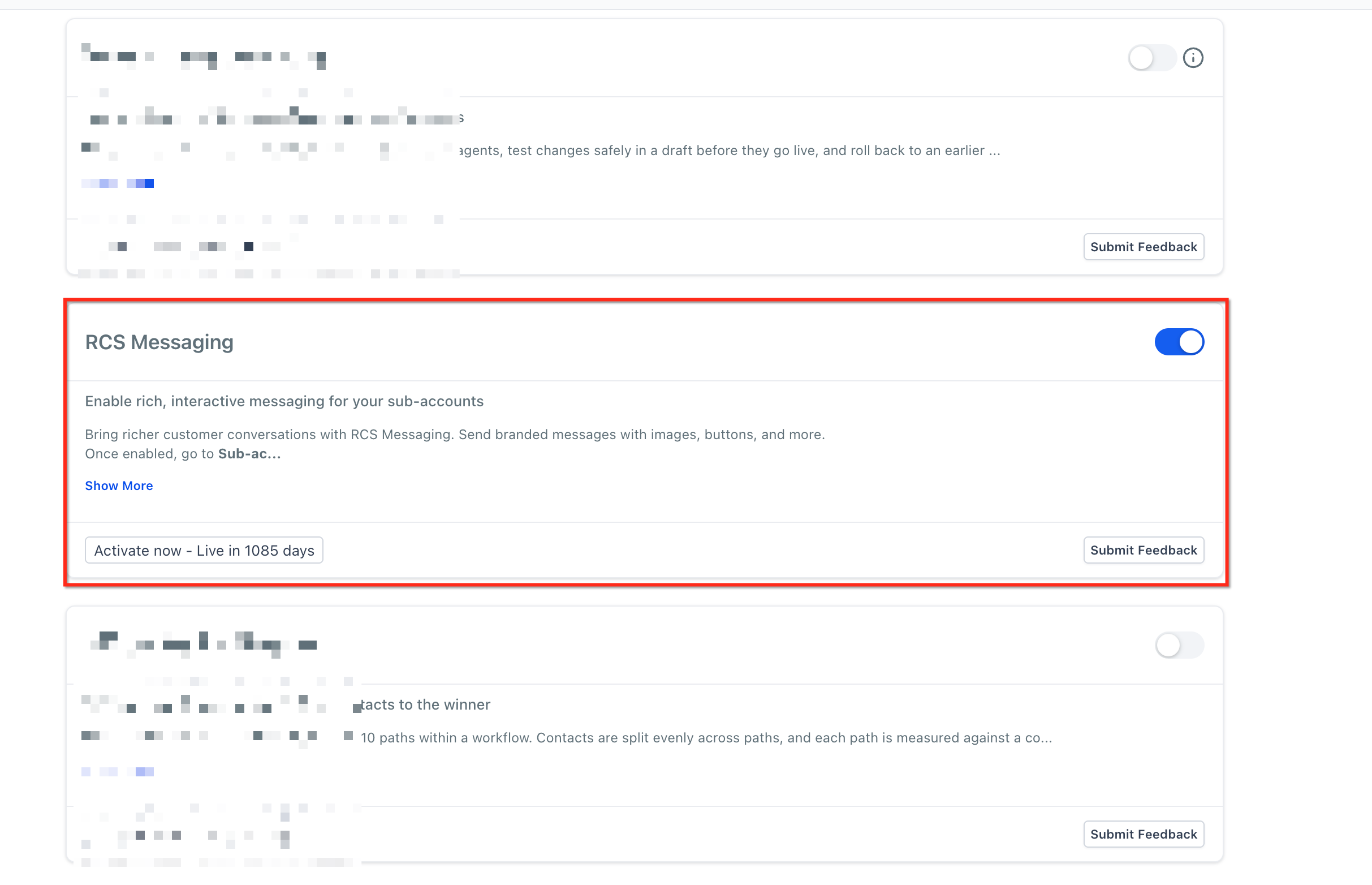
Step 1Enable RCS Through LabsIn Agency View → Settings → Labs , locate RCS Messaging . Use the available feature controls to enable access for the intended sub-accounts. For supported assignments, use the Sub-account tab and Manage . Where RCS is exposed in sub-account Labs, it can also be enabled under Sub-account Settings → Labs .
Open an enabled sub-account and go to Settings → Phone System → RCS Messaging . Start the guided sender onboarding process.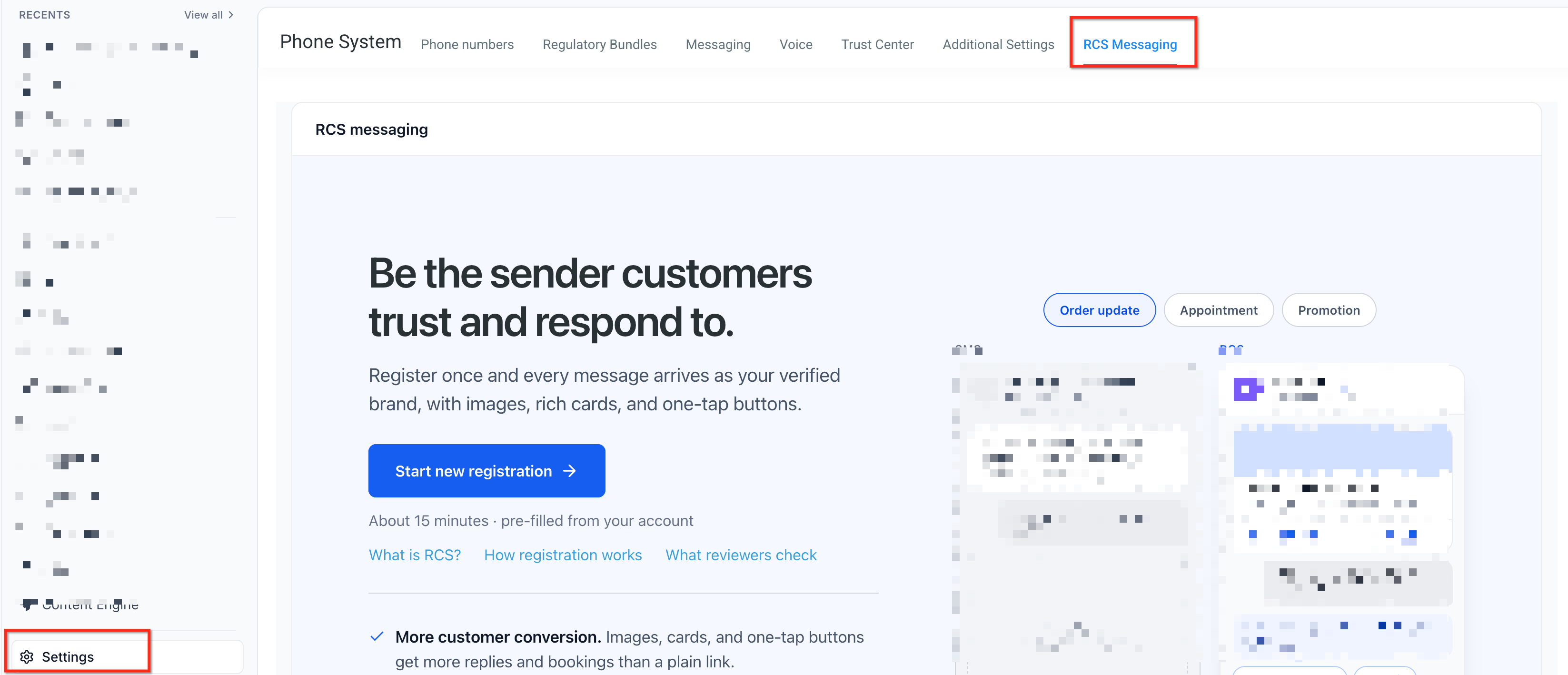
Provide the requested information across Brand Identity, Countries, Sender Details, US Carrier Registration (if applicable), and Review and Submit . Save your progress if you need to return later. Submit the application when the details are complete.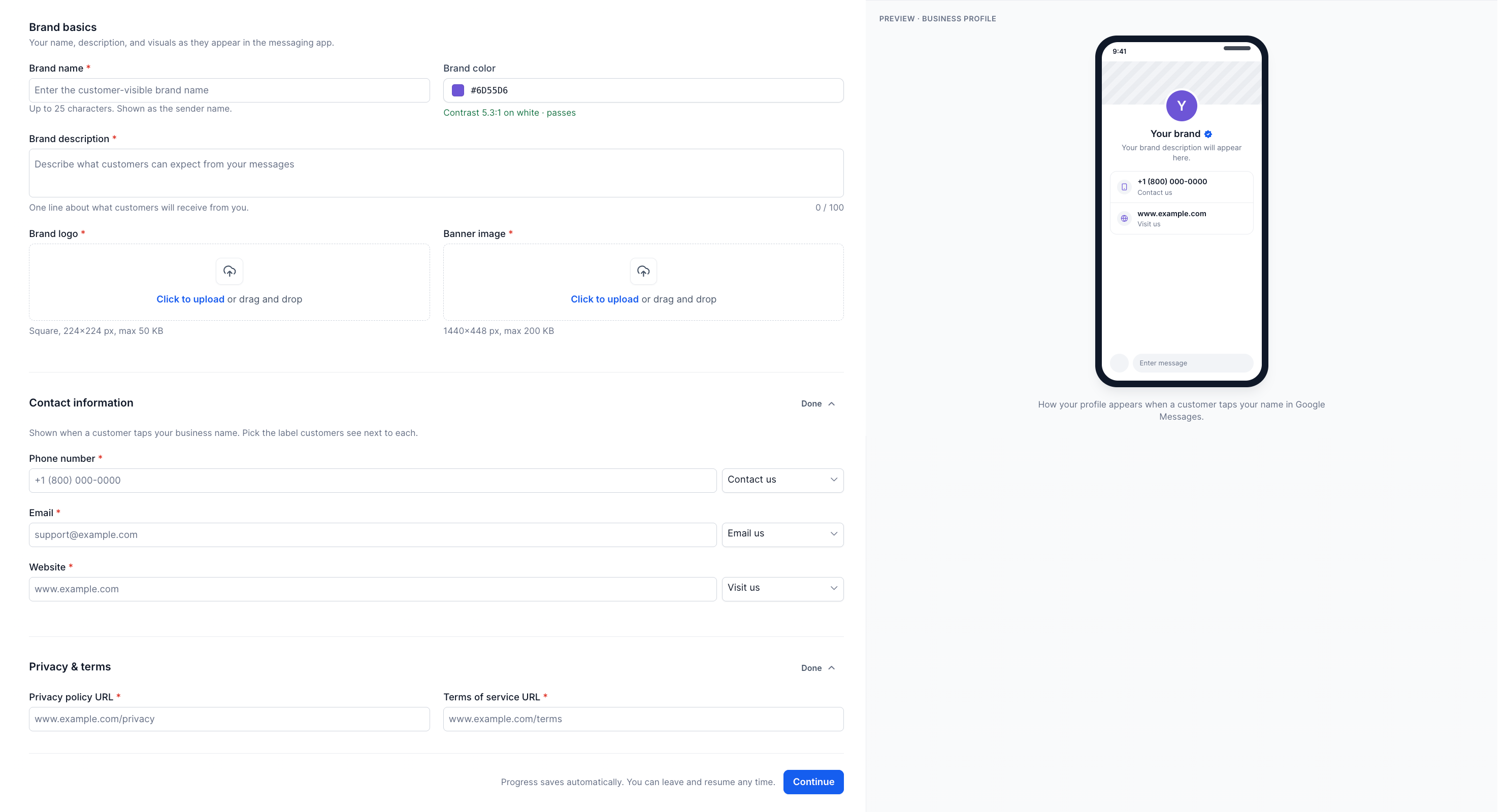
Return to Settings → Phone System → RCS Messaging to review progress and respond to any requests for additional information. Once the sender is approved and activated, its status changes to Live . Carrier and provider review are still required.
Step 5Test and Start MessagingYou can add supported test devices to try RCS before live approval. After your sender reaches Live , send RCS through supported Conversations, Bulk Messaging, Workflows, and reusable RCS Snippets . Confirm consent and the recipient’s RCS compatibility first.
11Message Statuses
After a message is sent, the platform shows delivery signals directly in the conversation view:
| Status | What It Means |
|---|---|
| Sent | Message left the platform and is in transit. |
| Delivered | Message arrived on the recipient's device. |
| Opened | Recipient viewed the message (where the device supports read receipts). |
Read receipts are only available when the recipient's device and messaging app support them, and recipients can turn this off. Treat it as a useful signal when it appears, not a metric you can rely on universally.
12Pricing and Billing
RCS billing is based on message type and direction. Here's the full breakdown for US messages:
| Message Type | Direction | Billing Unit | Price (USD) |
|---|---|---|---|
| Basic RCS Text | Outbound | Per segment | $0.0083 |
| Basic RCS Text | Inbound | Per message | $0.0083 |
| Rich RCS | Inbound | Per message | $0.0165 |
| Rich RCS | Outbound | Per message | $0.0220 |
- Agency Accounts: standard Twilio pricing
- Location Accounts: Twilio pricing + 5% markup
Before an RCS sender can message US recipients, it must complete a United States registration in addition to Google RCS registration. US registration comes with third-party fees that are separate from per-message charges. Twilio does not set these fees, they come from the brand verification provider and the US carriers.
| Fee | Charged By | Amount (USD) | Frequency |
|---|---|---|---|
| Brand Verification | Aegis (third-party brand verifier for the US) | $200 | Annual |
| Carrier Onboarding (T-Mobile submission) | US carriers, e.g. T-Mobile | $500 | One-time, per new RCS sender |
A brand registers one new US RCS sender.
- Year one: $200 + $500 = $700 in registration fees
- Each following year: $200 for brand verification renewal
Per-message RCS charges and carrier fees are billed on top of this.
13Failed Message Billing
How you're billed when RCS delivery fails depends on whether the SMS fallback succeeds:
Scenario ARCS fails → SMS fallback deliversNo RCS charge. You pay only for the SMS that successfully delivered.
Scenario BRCS fails → SMS fallback also failsA static processing fee of $0.001 applies, unless the failure matches specific Twilio error codes (30036 , 30002 , 30450 , 21408 , and others), in which case no fee is charged.
Good to Know: First-Attempt RuleFirst-attempt RCS failures that trigger SMS fallback are not charged. A fee only applies if the final SMS fallback also fails.
14Frequently Asked Questions
Q: Why did my test message arrive as SMS instead of RCS?The recipient may not currently meet the device, app, network, carrier, or RCS-setting requirements for RCS. If SMS fallback is enabled, fallback in this situation can be expected behavior.Q: Does an Opened status appear for every RCS recipient?No. Read or Opened signals depend on the recipient's device, messaging application, and settings. Recipients may also disable read receipts.Q: Can I send an RCS Snippet directly to one contact?Supported 1:1 RCS messaging is available through Conversations for enabled accounts. Feature availability can vary by account and sender approval.Q: Can RCS be automated through Workflows?Yes. Supported RCS Workflow actions can automate messaging in enabled sub-accounts after the sender is approved for live messaging.Q: Why does my RCS cost differ between messages?Billing can differ based on country, message direction, whether the message contains media, message classification, and applicable segmentation or carrier rules. See Pricing and Billing above for current US pricing.Q: Should I put important information only inside an RCS button?No. Some contacts may receive an SMS fallback that does not preserve the rich RCS experience. Keep critical information and calls to action understandable in the fallback text.Q: Why can't I select an RCS Sender ID when sending?Confirm that RCS is enabled for the sub-account in Labs. Open Settings → Phone System → RCS Messaging and confirm the sender has completed registration and is Live. Review any outstanding approval requirements.Q: If a contact opts out via SMS, can I still reach them on RCS?No. Opt-outs apply across both channels, a contact who replies STOP (or any other opt-out keyword) on SMS is suppressed on RCS too, and vice versa.Q: Do I still need to join a Private Beta list or ask Support to activate RCS?No. Agencies can enable RCS through Labs for selected sub-accounts, and businesses can submit sender registration directly. Carrier and provider approvals remain required.Q: Can I test RCS before my sender goes Live?Yes. Supported test devices can be added to try RCS during onboarding, but live customer messaging still requires an approved sender.15Ready to Get Started?
A clear next action helps you move from Labs activation to an approved sender and your first RCS message.
You can begin by enabling RCS for a selected sub-account in Labs. Complete sender registration under Settings → Phone System → RCS Messaging , then track the review until the sender reaches Live .
More in Open Doors Phone
- Why are my Calls marked as Spam and how can I avoid it
- Phone Number Settings Explained
- How to Purchase a Phone Number for Your Business
- Forbidden message categories for SMS and MMS in the US and Canada
- A2P 10DLC Campaign Approval Best Practices
- SMS Compliance Guide: Consent, Opt-Outs, and Sending Limits
- Brand Registration Step by Step Guide and FAQs
- Toll-Free Verification Guide for LC - Phone (US/Canada)
- Detailed Pricing for A2P 10DLC Registrations
- What is A2P 10DLC?
- Brand Approval Best Practices for A2P 10DLC
- A2P 10DLC Brand Approval Best Practices